
What is Seller Radar?
Seller Radar highlights valuation opportunities available to you. These may be users who originally submitted a property enquiry and have since gone on to request a valuation, or carry out an online valuation elsewhere, users who have indicated they have a property to sell but not requested a valuation, or users who have specifically requested a valuation from you. The manager allows you to view all your valuation contacts in one place.
Within the manager you’ll see the first interaction, opportunity reason and the status, along with the applicant’s details and current address.
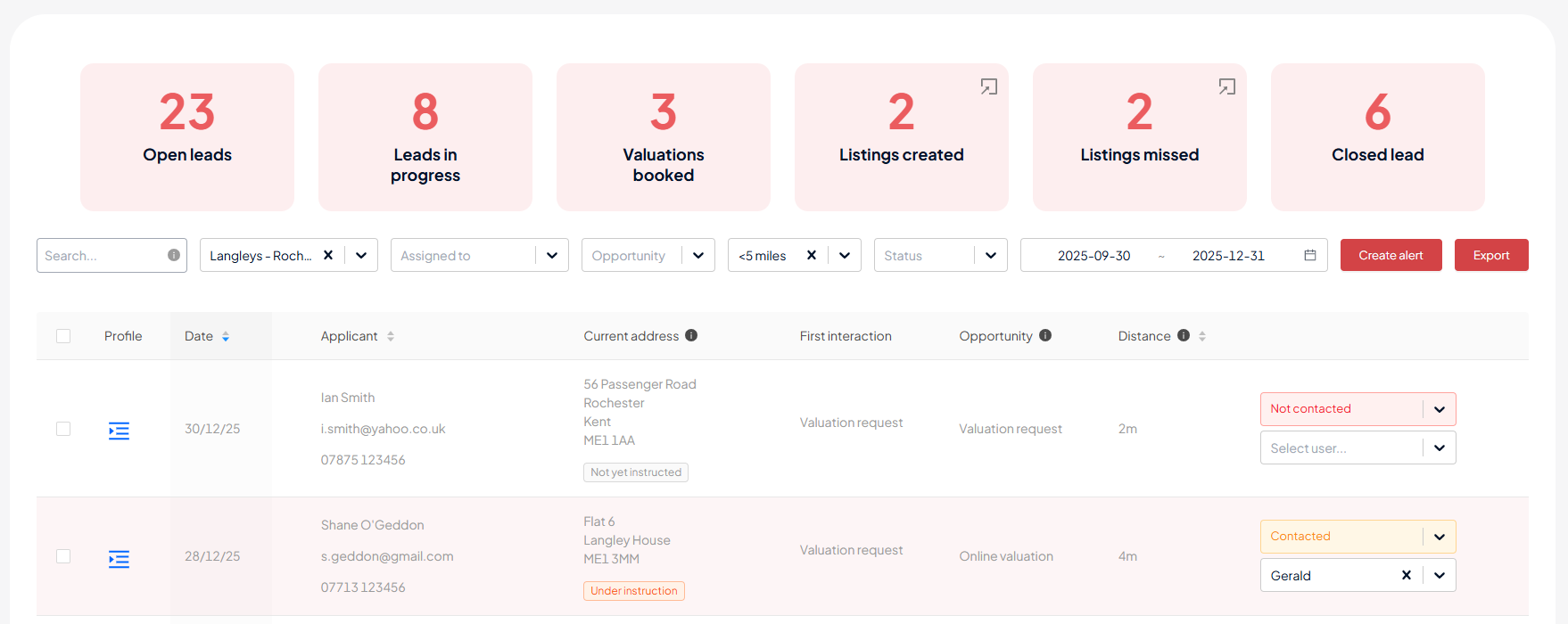
First interaction - how you first received this user’s details. This will be any of the following:
- Property enquiry – the user contacted you to enquire about a property you had to let or sell
- Agent enquiry – the user submitted an enquiry directly with your agency through your agent profile page
- Valuation request – the user requested a valuation from you
- Sales valuation – the user had previously requested a sales valuation more than 6 months ago
- Letting valuation – the user had previously requested a lettings valuation more than 6 months ago
Opportunity reason - there are four possible categories, as follow:
- Valuation requested – these are users who have requested a valuation
- Interested in a valuation – these are users who have previously contacted you and have since gone on to submit a valuation request elsewhere
- Online valuation – these are users who have previously contacted you and have since gone on to carry out an online valuation
- Property to sell – the user will have sent a lead to an agent selecting ‘I have a property to sell’ as their situation on a lead form, and or, selected they have a property to sell in MyPlace and be Buyer Ready.
Distance - This shows the distance of the property from the branch address. It’s possible to filter on valuations within 5, 3 or 1 mile from the branch.
Assigned to - this will show the name of the agent assigned to nurture this lead. You will have the option to assign leads to agents who have an OnTheMarket Expert account linked to the relevant office.
Status - this will show the current status of the lead. The available status options are: Not contacted, Left message, Valuation booked and Do not contact.
Create Alert - You can create an alert to be informed of new valuations and opportunities. The email will be sent to the logged in user when a new potential vendor is found.
Selecting the icon on the far left will open the lead drawer where there is the ability to leave notes and view further information.
Seller Radar is available to agents on a Pro package. If you’re interested in upgrading, please reach out to your dedicated account manager. Alternatively, you can contact the technical support team at support@onthemarket.com or by calling 0808 1202 877 (option 2).
Back to home
Related articles
How do I export my phone leads?
How do I download a phone lead recording?
What are call types and their definitions?
Why is my phone number different on the website?
Join our beta testing community
Need to get in touch?
You can also give us feedback